Promo code · Canada
Rainbet referral code BOOST20 — where to enter it
Two moments matter: the registration form, and the Redeem Affiliate panel inside Deposit. This page shows both, with the actual Rainbet screens, so you are not hunting through menus with a deposit already pending.
Referral code Verified
First, the terminology
Referral code, promo code, affiliate code — one string
Rainbet uses three different words for the same box depending on where you are in the interface. The registration form calls it a referral code. Marketing pages and third-party sites call it a promo code. Inside the Deposit panel, the field is labelled Affiliate Code. In every case the value you type is the same: BOOST20.
What the code does is link your account to the person or site that referred you and attach the associated offer — in this case a 20% Rakeback Boost. Rakeback is a return of part of the house margin already taken from your play, so a boost increases that return rather than handing you a fixed amount of cash. It is not a deposit bonus, and the value depends entirely on how much you actually play.
Worth reading before you start: the Redeem Affiliate panel on Rainbet states that the affiliate code should be claimed before depositing and that it is intended for new users. If you plan to use BOOST20, enter it first and confirm it, then move on to funding the account.
Method 1
Entering the code while you register
The cleanest route. The code is attached from the moment the account exists, so there is nothing to fix later.
-
Open Rainbet through a referral link
Following rainbet.com/?r=boost20 usually pre-fills the referral field for you. It is still worth checking the box visually rather than assuming it landed.
-
Start the sign-up form
Choose Register / Sign Up and fill in the standard account details. Do not submit yet.
-
Find the referral or promo code field
On some layouts the field is visible straight away; on others it sits behind a small "Have a referral code?" toggle underneath the password box. Expand it if it is collapsed.
-
Type BOOST20 and finish registering
Enter the code in capitals with no spaces, then complete the form and verify your email if prompted. Once the account is created, the referral link is set.
Method 2
Adding BOOST20 after registration through Deposit
Already made an account without a code? The affiliate field lives inside the Deposit panel. Here is exactly what you will see on each screen.
-
Sign in to your Rainbet account
The affiliate panel is only reachable from a signed-in session. Log in first — there is nothing to redeem from a logged-out page.
-
Open the Deposit section
Use the Deposit button in the site header. The panel opens on the Deposit tab, sitting alongside Withdraw, Buy Crypto, Tip and Redeem. The left side handles currency, network and deposit address; the right side holds a short stack of cards.
-
Select "Redeem Affiliate" on the right
At the top of that right-hand column is a card marked Redeem Affiliate, with the note "Claim before depositing, new users only". That card is the entry point — not the Redeem tab at the top of the panel, which handles other item types.
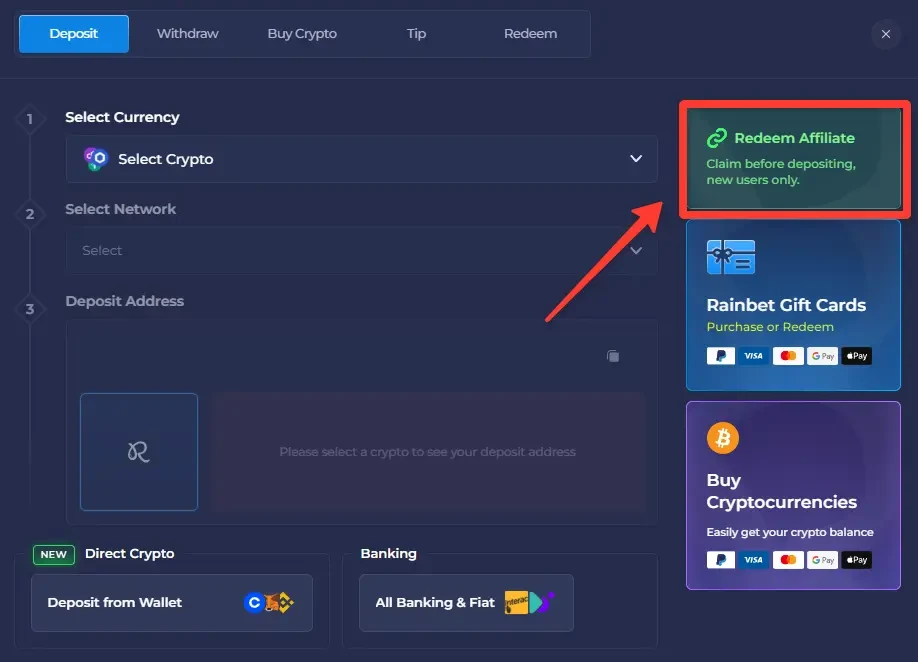
The Deposit panel. Redeem Affiliate is the first card on the right, above Rainbet Gift Cards. -
Type BOOST20 into the Affiliate Code field
The Affiliate Code screen explains that redeeming a code here claims possible rewards and credits the player who referred you. Enter BOOST20 in the single input box — capitals, no spaces before or after.
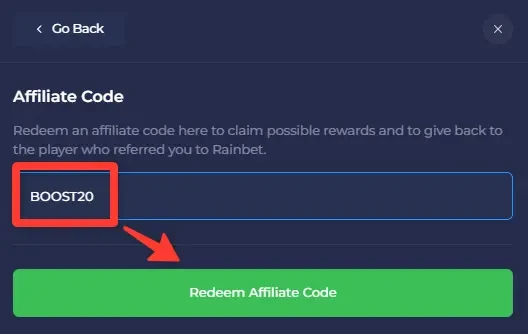
The Affiliate Code screen with BOOST20 entered, ready to submit. -
Confirm the code before you deposit
Press Redeem Affiliate Code and wait for the on-screen confirmation. Only once the code is accepted should you go back to the Deposit tab and fund the account. Depositing first is the most common reason people find the field will no longer take a code.
No guaranteed payout. Redeeming BOOST20 attaches a 20% Rakeback Boost to your account. It does not credit a fixed sum, and it does not promise a return on any deposit. What the boost is worth depends on your own play and on the terms Rainbet applies at the time you redeem it.
Side by side
Which method applies to you
| Your situation | Where to enter BOOST20 | Watch out for |
|---|---|---|
| No Rainbet account yet | Referral / promo field in the sign-up form | The field is sometimes collapsed behind a "Have a code?" link. |
| Account created, nothing deposited | Deposit → Redeem Affiliate → Affiliate Code | Confirm the code first, deposit second. |
| Account created and already funded | Deposit → Redeem Affiliate (may no longer accept it) | The panel notes the code is meant to be claimed before depositing, new users only. |
| Code typed but rejected | Re-enter carefully, then contact Rainbet support | Stray spaces and lower-case letters are the usual culprits. |
After the code
What to play once the account is set up
The code is an account-level setting — it does not change any game. These are the chicken titles most Canadian visitors head to first.
Questions
Rainbet promo code FAQ
What is the Rainbet referral code?
BOOST20. It is the referral code used throughout this site and it links a new Rainbet account to a 20% Rakeback Boost offer. The same string works whether you call it a referral code, a promo code or an affiliate code — Rainbet uses all three labels in different parts of the interface.
Where do I type the code during registration?
The sign-up form contains a referral or promo code field, sometimes hidden behind a small "Have a code?" link. Enter BOOST20 there before submitting the form so the account is created with the code already attached.
Can I add the code after I have already registered?
Yes — that is what the Redeem Affiliate panel is for. Sign in, open Deposit, select Redeem Affiliate, enter BOOST20 in the Affiliate Code field and confirm it before completing your deposit. Rainbet notes on that panel that the affiliate code should be claimed before depositing and that it is intended for new users.
Is BOOST20 different from a promo code or an affiliate code?
No. Rainbet labels the same field differently depending on the screen — "referral code" on the registration form, "Affiliate Code" in the Redeem Affiliate panel. BOOST20 is the value you enter in either case.
What does the 20% Rakeback Boost actually mean?
Rakeback returns a share of the house edge already taken from your play back to your account. A 20% boost increases that share by a fifth relative to the standard rate. It is not a cash bonus and it is not a guaranteed amount — what you receive depends entirely on how much you play and on the terms Rainbet applies at the time.
Does the code change how Chicken Cross plays?
No. A referral code affects account-level rewards only. Chicken Cross, The Great Chicken Escape, Chicken Rush and Chicky Run behave exactly the same with or without BOOST20 attached.
The code was not accepted — what now?
Check for stray spaces around the text, confirm it is typed in capitals as BOOST20, and make sure you have not already deposited, since the panel states the affiliate code should be claimed beforehand. If it still will not go through, Rainbet support is the only party that can look at your specific account.
Code copied? Time to cross the road
Attach BOOST20 first, confirm it on screen, then head for the chicken lobby with a session budget already decided.